The following logging programs support the Colorado QSO Party:
County-Line Operators & Rovers:
If you’ll be operating on a county line (mobile or portable), be sure to see our County-Line and Rover Logging Guide
N1MM Logger+
N1MM is the most widely-used advanced contest logging software in amateur radio. Version 1.0.11067 or later supports the new COQP rules. For Windows only.
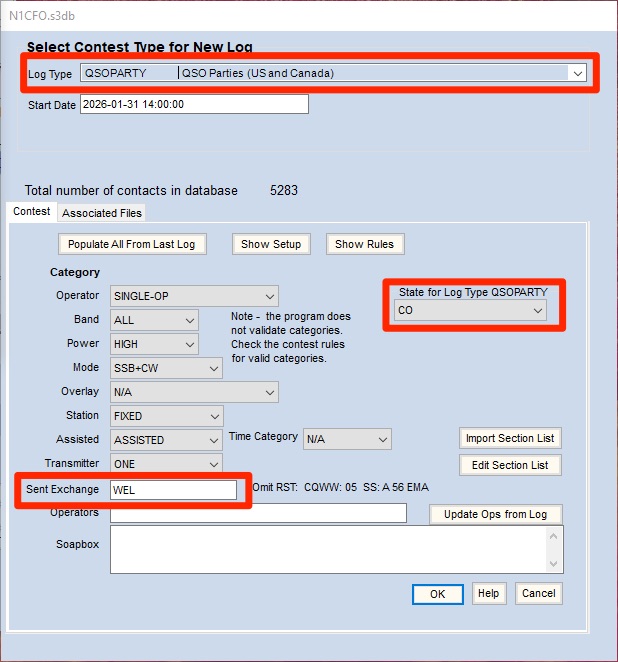
- Click on “File -> New log in database…”
- Next to “Log Type”, select “QSOPARTY QSO Parties”.
- In the dropdown in the middle right, select “CO”.
- In the “Sent Exchange” field:
- Colorado stations: enter your 3-character county abbreviation.
- Non-Colorado stations: enter your state or province abbreviation, or “DX” if outside US and Canada.
- Click “OK”.
Cost: Free
N3FJP – Amateur Contact Log – specifically for CO QP
If you’re new to contest logging software, N3FJP’s Amateur Contact Log offers a gentler learning curve than N1MM. For Windows only.
- Download the Colorado QSO Party software:
- Stations operating in Colorado: CO QSO Party in-state
- Stations operating outside CO: CO QSO Party out-of-state
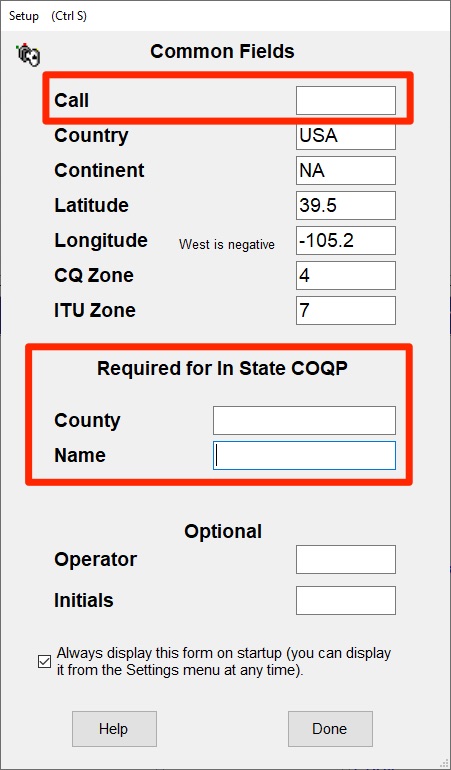
- Enter information:
- In-state: Call, County and Name
- Out-of-state: Call, State abbreviation and Name
Cost: $8.99 for COQP only. Other registration options: https://www.n3fjp.com/aclog.html
Other Loggers
DXLog
This logger is used by many avid contesters.
The 2026 COQP rules are supported.
Note: If you work county-line Colorado stations, you may not see the both separate QSO log enrtries until the Cabrillo file is exported.
Cost: Free
WriteLog
WriteLog is a contest logger with real, purpose-built support:
- it has an active Colorado QSO Party module that already expects the standard call/name/3-letter-county exchange, and
- WriteLog has genuine rover and county-line handling proven out in other states’ QSO parties (for example, pre-filling all counties from a previous QSO when the same rover call is worked a second time).
- Confirm you’re running WriteLog’s current Colorado QSO Party contest module (check for updates before the event).
- Set your Station/Operator Category to Rover (or the equivalent county-line designation) — this is what activates WriteLog’s per-county entry behavior, the same as its CA/PA/FL rover handling.
- At a tripoint, log each claimed county as its own entry using WriteLog’s rover-mode county entry;
- consult WriteLog’s built-in Help for “rover” once the COQP module is loaded, or WriteLog’s own support/forum, for the exact keystroke sequence — their public site doesn’t document it step-by-step.
- Of the four programs in this section, WriteLog is the closest to N1MM+’s and DXLog’s level of built-in automation for this rule.
Ham2K PoLo (Portable Logger), by Sebastian Delmont KI2D
PoLo does has a Colorado-centric template or “Activity” that was built for the Colorado QSO Party. This “Activity” should score CW-only and SSB-only contests correctly, including the bonus points for mobile or portable operations. Please note, KI2D has advised that, as of now, mixed-mode operations will NOT be scored correctly. However, future updates to the CO QSO party may address mixed-mode operation scoring, amongst other feature updates and additions.
Basic-level instructions to set PoLo for the CO QSO Party is below. For general and overall logger operating instructions, refer to the manual here: https://polo.ham2k.com/docs/
- After selecting/adding a new operation, move to the OPERATIONS tab and select “Add Activity”
- Select “QSO Parties (Beta) and then select the Colorado QSO Party from the drop down selection tool.
- The “Your Exchange” selection is where the operator will enter their county abbreviation if you are in-state. PoLo will recognize the county as you type. If you are out-of-state, enter the two-letter abbreviation for the state. Again, PoLo will recognize that you are an out-of-state operator.
- Select if you are operating mobile or Rover. Also select this if you are portable and plan to operate in one or more counties. This is required if you wish for PoLo to properly track awarded bonus points, if applicable. Refer to COQP rules regarding bonus points.
- Add your email address to have it added to your exported Cabrillo file
- Choose any desired spotting selections per the rules of your entry category.
Exporting your logs:
- To export your log in ADIF and/or Cabrillo, choose “Manage Operation Logs” in the OPERATIONS tab. You will be afforded the opportunity to export a basic ADIF log, a full ADIF (more data), and/or a Cabrillo log. Make your selections, click “Export” and follow the instructions.
POTACAT
POTACAT isn’t a contest logger in the same sense as the others — it’s a spotting and remote-CAT-control tool (POTA/SOTA/DX spot aggregation, one-click QSY, remote operation via its companion app ECHOCAT).
- It doesn’t track contest exchanges or produce a Cabrillo file itself.
- Instead, it forwards logged contacts live to a separate program you choose — Log4OM, DXKeeper, HRD, N3FJP, or Wavelog.
- Because of that, there’s no county-line setting to configure inside POTACAT.
- Whichever downstream logger it’s feeding is the one that actually needs the county-line workflow — if that’s N3FJP or another program not covered above, treat each claimed county as a fully separate QSO entry in that program, same call/band/mode/time, one county per entry.
WRL (World Radio League) app.
worldradioleague.com
WRL auto-builds a contest-specific logbook with the right exchange fields when you enroll in a listed contest, including the CO QP. However, its published documentation shows no rover or county-line mechanism — no compound-exchange splitting, and no location-change command comparable to N1MM+’s COUNTYLINE or PoLo’s BREAK.
- If you use WRL for COQP, plan to log county-line contacts manually: Create one full, separate QSO entry per claimed county — same call, band, mode, and time, with only the county in the exchange changed.
- I’m not quite sure what this means? Do you mean the operator would go back “post contest” and add a separate QSO for each additional county in which they operated? I’m not sure this would work. WRL can only export a CAB file showing a singular county. I guess they could create an entirely new log for each county. But, then they run into another problem. How do they later combine the multiple CAB files into a singular one?
- Never enter a compound county value like ELP/TEL directly into a single exchange field — WRL has no mechanism to split it back out later.
HAMRS:
- Like PoLo, HAMRS was built to support the needs of mobile and portable operations. HAMRS does not offer direct support for QSO Parties, including the CO QSO Party. However, it does offer the ability to build custom templates that may work for your preferred logging needs. Users can export both ADIF and Cabrillo files, although the exported data would need to be manipulated so that the submitted log meets the CO QSO Party requirements. Refer to the HAMRS website for details on this program.
Other programs which generally support county-line QSOs in QSO parties, but do not necessarily provide dedicated support for the CO QSO Party.
- WriteLog,
- TR4W,
- GenLog,
- RUMLogNG (Mac), and
- SkookumLogger (Mac)
- generally, with a slash-separated exchange (or, in WriteLog’s case, separate county fields for out-of-area entrants).
- Operators who prefer these should use a current version and enter the counties per that program’s convention
IMPORTANT NOTE: The CO QSO Party committee has not verified the full support or accuracy of scoring and other nuances of logging the CO QSO Party with the above reference logging programs.